

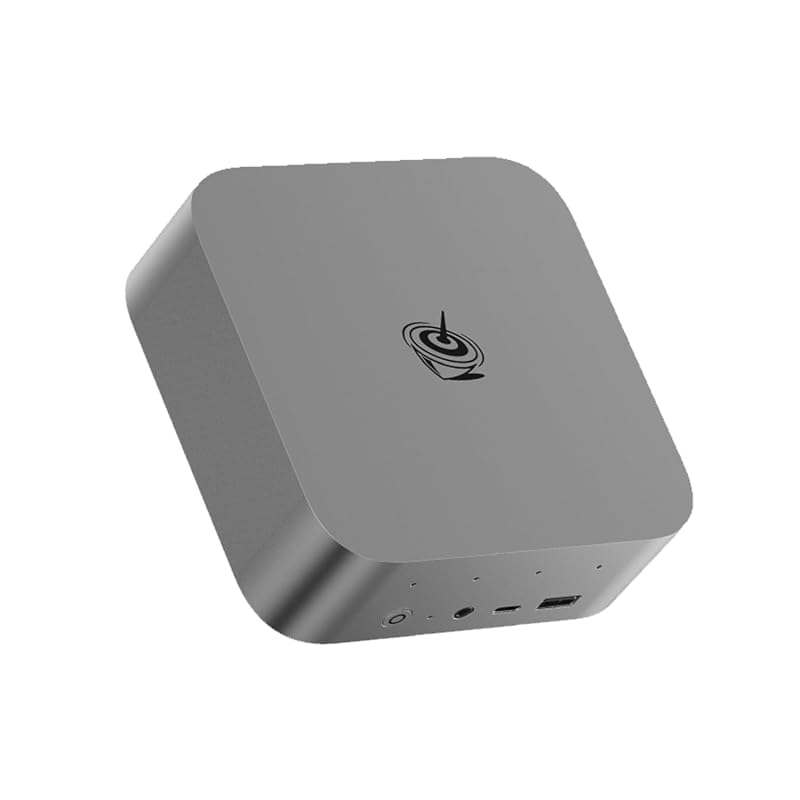
The 2026 mini PC market crossed a threshold most prebuilt-tower buyers haven't caught up to: a $700 Ryzen-class mini PC outperforms most $1,200 prebuilt towers from 2022. The Ryzen 7 8745HS, 8745H, and Ryzen 9 7940HS chips (Zen 4 mobile, 8 cores, RDNA 3 iGPU) ship in half-liter cases with desktop-class DDR5 RAM and PCIe 4.0 storage. iGPU performance handles 1080p gaming for most titles three or more years old. The three picks cover the current market: a creator-tier pick at $719 (the faster Ryzen 9, 2 TB of storage and a 3-year warranty, and the cheapest of the three), a slim value pick at $839, and the popular Beelink option at $859. A mini PC falls short for top-tier gaming rigs (RTX 5090 at 4K), competitive esports where every millisecond of input lag matters, and workloads that need a discrete GPU (1440p AAA, heavy ML training, 3D rendering). External-GPU upgrade paths exist but vary by manufacturer (OCuLink, USB4, proprietary docks); verify your specific Mini PC's eGPU compatibility with the vendor before buying.
Minisforum UM870 Slim Mini PC
Ryzen 7 8745H · 32 GB DDR5-5600 · 1 TB PCIe 4.0 · USB4 · ~$839
The UM870 is the value pick of the current Mini PC market and a common desk-corner default. It has a 0.5-liter slim aluminum case (about the volume of a hardcover book), full-aluminum chassis, hidden ports on the back, $839 with 32 GB DDR5 and a 1 TB NVMe pre-installed. It costs $20 less than the Beelink SER8 with effectively the same Ryzen 7 silicon.
- 0.5-liter case is the smallest here; hides on a desk corner or behind a monitor
- Full-aluminum chassis with vapor chamber cooling, per Minisforum
- Industrial-grade I/O selection: dual 2.5G Ethernet, USB4, four USB-A, full-size HDMI + DP
- Same Ryzen 7 silicon as the Beelink SER8 for $20 less, in the smallest case of the three
- Slim form factor means no 3.5-inch HDD bay; storage upgrades are M.2-only
- Some configurations ship without OS; verify the listing if you want pre-installed Windows
- Minisforum US support response time is slower than Beelink; warranty claims take longer to resolve
Minisforum's UM870 is the value play of the current Mini PC market. The chassis is full aluminum, the case is 0.5 liters (about the volume of a hardcover book), and the ports are hidden on the back. The CPU is the Ryzen 7 8745H (the 'H' is the desktop-bound variant of the 'HS' in the Beelink SER8), within margin-of-error performance. At $839 it undercuts the Beelink by $20, with the same RAM and storage configuration, though the Geekom A7 now sells for $120 less than either. Minisforum builds it around a vapor chamber rather than a plain heatsink and fan. For users buying their first mini PC in 2026, this is the rational choice.
Geekom A7 Mini PC (2026 Edition)
Ryzen 9 7940HS · 32 GB DDR5 · 2 TB PCIe 4.0 · USB4 · WiFi 6E · ~$719
The A7 takes the value position outright: the fastest CPU of the three picks at the lowest price. Ryzen 9 7940HS (8 cores, 16 threads, 5.2 GHz boost) with 32 GB of DDR5 and a 2 TB SSD for $719, against $839 for the UM870's 8-core Ryzen 7. It is the default pick for buyers who run long CPU jobs (video render, ML inference, virtualization), and a no-compromise choice for general use.
- 5.2 GHz boost versus 4.9 GHz on the UM870 and SER8, and $120 cheaper than either
- Ships with 2 TB of storage where both competitors ship 1 TB
- 3-year warranty, against Beelink's 1 year and Minisforum's 2
- USB4 at 40 Gbps, 2.5-gigabit ethernet, and quad-display output, per Geekom
- One M.2 2280 slot, so a storage upgrade means cloning to a bigger drive rather than adding a second
- Wi-Fi 6E rather than Wi-Fi 7, which matters only if your router is newer than the PC
- Gaming performance is identical to the cheaper picks (same Radeon 780M iGPU), so pure gamers get little from the faster CPU
- 28 ratings on the current listing, against thousands on the Beelink; Geekom's US documentation is thinner than Beelink's
Geekom's A7 became the best-overall pick on price. It sells for $719 against $839 for the UM870 and $859 for the SER8, and it carries the faster chip: the Ryzen 9 7940HS has the same 8 Zen 4 cores as the 8745H family with a higher 5.2 GHz boost. For pure gaming, the Radeon 780M iGPU caps performance at the same ceiling as the other two, so the value goes to anyone who runs long CPU jobs: video editors, ML practitioners, anyone running a few VMs locally.
Read the storage spec before you buy. Geekom's own spec sheet lists one M.2 2280 PCIe 4.0 slot, rated up to 4 TB, where the UM870 and SER8 each give you a second slot. The machine ships with 2 TB, so most buyers will never open it, and the ones who do will be cloning rather than adding. The case is the other surprise: at 4.43 by 4.41 by 1.46 inches it is no bigger than the UM870, not the desk brick its port list suggests.
Combined with the 3-year warranty, the A7 is the pick for users planning to keep the PC five years. Buy the UM870 instead if you want the vapor-chamber cooling on a desk, or the SER8 if brand support matters more than $140.
Beelink SER8 Mini PC
Ryzen 7 8745HS · 32 GB DDR5-5600 · 1 TB PCIe 4.0 · USB4 · WiFi 6 · ~$859
Beelink is the most-recognized brand in the Mini PC space, and the SER8 is the easiest to find Reddit support threads for. Ryzen 7 8745HS, 32 GB DDR5, 1 TB NVMe at $859. The premium over the UM870 ($20) and the Geekom A7 ($140) buys you Beelink's reseller relationships, the most-active community of buyers, and the largest accessory ecosystem (Beelink-branded eGPU docks, NAS expansions, etc.).
- Radeon 780M iGPU handles 1080p gaming on most titles
- Largest user community and most third-party accessory support in the Mini PC category
- Beelink's own expansion ecosystem (EX Docking Station for Beelink-specific eGPU paths)
- Customer support response time is the fastest of the three brands
- $140 premium over the Geekom A7, which has the faster CPU of the two
- Out-of-the-box Windows install includes some bloatware; clean reinstall recommended day one
- A 1-year warranty, against 2 from Minisforum and 3 from Geekom
The Beelink SER8 is the popular pick. The Ryzen 7 8745HS silicon is essentially the same as the UM870's 8745H (the 'HS' suffix is a power-tuning variant, not a different chip). For first-time Mini PC buyers who want the established brand with the most community support, the SER8 is the safe choice. For value-driven buyers who want the same Ryzen 7 silicon for $20 less, the UM870 is the obvious swap. For workload buyers who want a faster CPU for $140 less, the Geekom A7 is the swap. You pay the SER8's premium for brand recognition and ecosystem (Beelink's own EX Docking Station supports their proprietary eGPU expansion path, which is brand-locked but works well for users who already own Beelink hardware); the raw silicon performance is the same.
The numbers.
| Minisforum UM870 | Geekom A7 | Beelink SER8 | |
|---|---|---|---|
| CPU | Ryzen 7 8745H | Ryzen 9 7940HS | Ryzen 7 8745HS |
| Cores / threads | 8 / 16 | 8 / 16 | 8 / 16 |
| RAM (default / max) | 32 / 96 GB | 32 / 64 GB | 32 / 96 GB |
| Storage | 1 TB (2 M.2) | 2 TB (1 M.2) | 1 TB (2 M.2) |
| WiFi | WiFi 6 | WiFi 6E | WiFi 6 |
| Case volume | ~0.5 L | ~0.47 L | ~0.7 L |
| Warranty | 2 years | 3 years | 1 year |
| Street price | ~$839 | ~$719 | ~$859 |
Other strong options.
ASUS NUC 14 Pro
The NUC 14 Pro is the Intel-based option for buyers who want Intel silicon, Thunderbolt connectivity, or a longer Intel support history. Core Ultra 7 165H, Intel Arc graphics, 32 GB DDR5, around $1,299. Gaming and content-creation performance trails the Ryzen picks (Arc graphics behind Radeon 780M; Intel's 6 P-cores, 8 E-cores and 2 low-power E-cores against Zen 4's 8 full performance cores), but the build quality and enterprise-grade firmware updates are its strengths. Worth the trade only for buyers who need Intel-specific features.
View on Amazon →The buying guide.
Mini PC vs. traditional tower: when small wins
Mini PCs win when the use case is desk space, noise, or specific I/O like wall-mounted media PCs. They lose when the use case is top-tier gaming with a discrete GPU (RTX 5090 builds need a full tower), parts-replaceability (a tower's GPU, PSU, and case fans are all swappable; a mini PC's are not), or thermal headroom for sustained heavy loads (mini PCs throttle under 30-minute Blender renders that towers don't). For most general-use, productivity, and 1080p gaming buyers in 2026, the mini PC wins. For workloads that need a discrete GPU, the tower is still the right answer.
iGPU gaming reality check
The Radeon 780M iGPU in all three picks handles 1080p at medium-high settings for any title released before 2024. Cyberpunk 2077 hits 55-65 FPS at 1080p medium with FSR Quality. Baldur's Gate 3 hits 60+ FPS at 1080p high. Helldivers 2 hits 60+ FPS at 1080p medium. The iGPU caps out at 1440p AAA gaming (drops to 30-45 FPS in most modern titles) and on any title with mandatory ray-tracing (Cyberpunk Phantom Liberty path-tracing mode is unplayable). For 1440p or ray-traced gaming, look at a tower with a discrete GPU instead; the GPU Buying Guide covers that path.
External GPU options vary by manufacturer
If you outgrow the iGPU, external GPU paths exist for some Mini PCs but the compatibility story is fragmented. Some Mini PCs expose Thunderbolt 4 / USB4 for generic eGPU enclosures (slowest path, 22-40 Gbps usable bandwidth). Some include OCuLink ports for direct PCIe 4.0 x4 connections (fastest, 64 Gbps, but requires OCuLink-specific eGPU adapters). Beelink offers their own proprietary EX Docking Station that works only with Beelink hosts. Each path has different speed, cost, and compatibility implications. Before buying with eGPU as the upgrade plan, verify the specific Mini PC's eGPU port type with the manufacturer and the matching enclosure's host-compatibility list; a mismatched enclosure is an expensive mistake.
RAM and storage upgrades
The UM870 and the SER8 ship with two SODIMM slots and two M.2 slots, with at least one of each empty; the Geekom A7 has two SODIMM slots and a single M.2 2280 that Geekom rates for up to 4 TB. RAM upgrades to 64 GB or 96 GB cost $100-200 (Crucial CT2K32G56C46S5 32-GB kit at $90 in May 2026). Storage upgrades to a second 2 TB or 4 TB SSD cost $150-350 (WD SN850X 4 TB at $290). Buy the base config and upgrade yourself: vendors charge 2-3x the open-market price for higher RAM/storage configurations at order time.
What to skip
The pattern to avoid is soldered RAM, which rules out some Beelink and Geekom models and most Apple Mac minis. It becomes a five-year ownership problem the moment you outgrow the launch capacity. A single M.2 slot is the softer version of the same trap: the Geekom A7 has one, so a storage upgrade there means cloning to a bigger drive rather than adding a second.
FAQ.
For 1080p gaming and titles three or more years old, yes. The Radeon 780M iGPU in the picks above performs roughly between a GeForce GTX 1060 and 1660 Super, which is enough for most non-ray-traced gaming at 1080p medium-high. For 1440p AAA or any title that benefits from ray tracing, you need a tower with a discrete GPU; the GPU Buying Guide covers the current picks.
For pure gaming or general use, 16 GB is still functional in 2026. For productivity (Chrome + Photoshop + a few apps), 32 GB is the comfortable floor. For ML inference, video editing, or virtual machines, 64 GB is the realistic target. The mini PCs above all ship with 32 GB and can upgrade to 64-96 GB via SODIMM, which makes 32 GB the right starting point even if you're not sure.
Brand recognition and ecosystem support. Beelink has stronger retail and reseller positioning. They also maintain their own accessory ecosystem (the EX Docking Station for their proprietary eGPU path, NAS expansions). For first-time buyers who want the established brand with the most community support, the SER8 is the safe pick. For value-driven buyers with no brand preference, the UM870 has effectively the same silicon at $190 less.
Yes, with caveats. Ubuntu 24.04 LTS and Fedora 41 both have full driver support for the Ryzen 7 8745HS / 8745H / 7940HS chips and Radeon 780M graphics. The non-trivial gotchas: Windows-only firmware update tools mean BIOS updates require a Windows boot or a USB flash drive prepared from Windows, and Beelink's pre-installed Windows license doesn't transfer to a Linux install (you forfeit a ~$120 OEM license). Geekom and Minisforum sell barebones (no-OS) versions of some models at $50-100 less; those are the Linux-friendly purchases.
All three idle in silence and spin up under sustained load. None of the three vendors publishes a decibel rating, and the figures that circulate in reviews come from different rooms and different microphones, so read them as impressions rather than measurements. The cooling design tells you more: the UM870 uses a vapor chamber, per Minisforum, while the SER8 leans on a conventional heatsink and fan.
For most buyers: the Geekom A7 at $719.
For the smallest case: the Minisforum UM870 at $839.
For the established brand: the Beelink SER8 at $859.
The Geekom A7 at $719 undercuts both competitors and carries the fastest CPU of the three, the 8-core Ryzen 9 7940HS at 5.2 GHz, plus 2 TB of storage and a 3-year warranty. Buy it unless the single M.2 slot or the Wi-Fi 6E radio rules it out. The Minisforum UM870 at $839 buys the smallest case and a vapor chamber instead of a plain fan, which is worth the $120 if the machine sits on your desk rather than behind the monitor. The Beelink SER8 at $859 is the swap if you want the most-recognized brand and the strongest community support, paid for in a $140 premium over the Geekom with a slower chip. For workloads that need a discrete GPU (1440p AAA, ray-traced gaming, heavy ML training), a tower remains the better answer; the GPU Buying Guide below covers that path.